- GTA San Andreas
- GTA Vice City
-
-
Featured Mod
 More
More 
- San Andreas Player For Android
-
-
- Grand Theft Auto III
-
-
Featured Mod
More 
- Ferrari 812 SF
-
-
Featured Mod More
Featured Mod More
| Author: | N4SPEED GTA | Email |
| Date: | 18.03.2026 |
| Downloads: | 49 | Statistics |
| Filesize: | 83.021 MB |
| Rating: | 0 votes |
Installation guide for Android 11 and above users.
Recently, with the latest Android releases, many GTA players and even modders have been unable to install mods, even simple ones, due to Google's blocking of access to the data folder and restricting applications, which has rendered many of them, especially older ones, useless and inoperable.
Are modded versions of GTA games for Android becoming a thing of the past?
The answer is no, it is still possible to install many of them, especially the most important ones such as cars, skins, background customization, and much more.
I'll guide you through some simple tricks and tools you need to create and install the mods you want on the following Android systems.
First and foremost, you need a GTA app that supports running the game using external, standalone files (without OBB files) and has root access on Android 11.
You might now be wondering where I can find it; no need to answer.
Second, you now need to extract the game files. To do this, follow these steps:
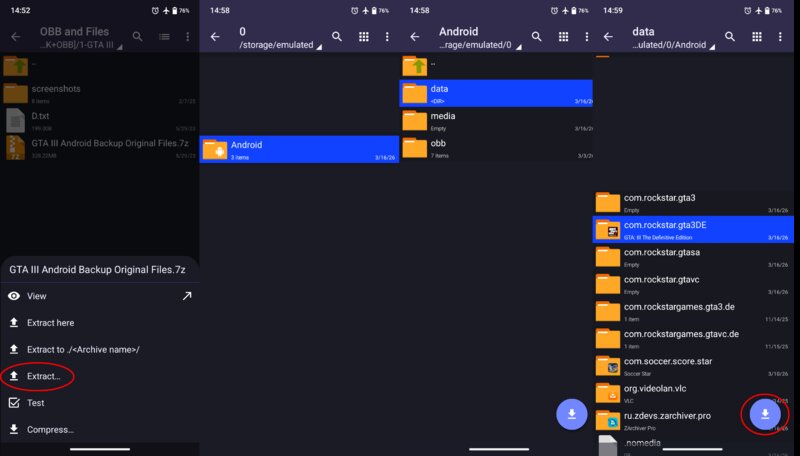
1. Use a file extraction program with full root privileges. Navigate to the OBB folder; you will immediately recognize the file you want to extract.
2. Select "Extract" and navigate to the data folder.
3. You will find folders there with the following names:
com.rockstar.gta3
com.rockstar.gtavc
com.rockstar.gtasa
com.rockstar.gtactw
4. Place the files inside the game folder from which you chose to extract the data, and make sure you do it correctly. I won't repeat my explanation again.
5. Launch the game to confirm the process was successful. For GTA III and VC, the intro video will appear immediately; for GTA SA, you will need to restart the game to confirm the process was successful.
Q: The game worked the first time, but now I can't run it. What's the reason?
A: The reason is that the write and modification permissions for system files were not allowed to perform their functions correctly.
Q: How do I fix that?
A: It's simple: Go to your data folder and find the folder containing the corrupted game file. Rename it, then run the game; without it, it will automatically stop working.
Now, go back to the folder; you'll find the data folder has reappeared. Move the files from the renamed folder to the newly created game folder, and the problem will be solved.
That was all for extracting and converting OBB files into data files.
##
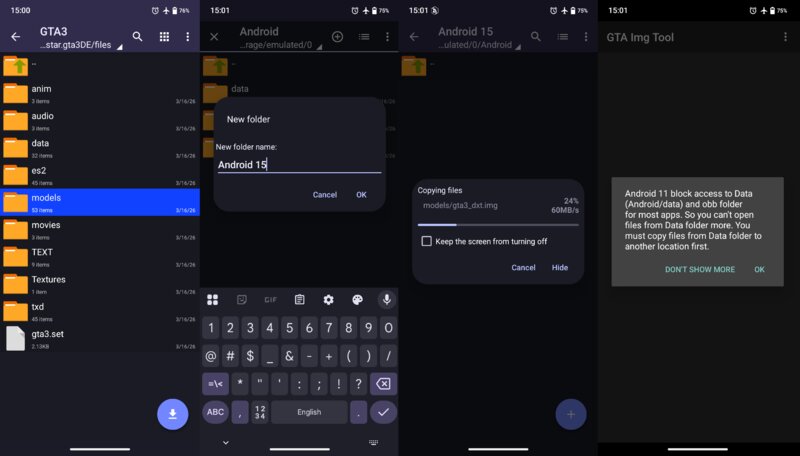
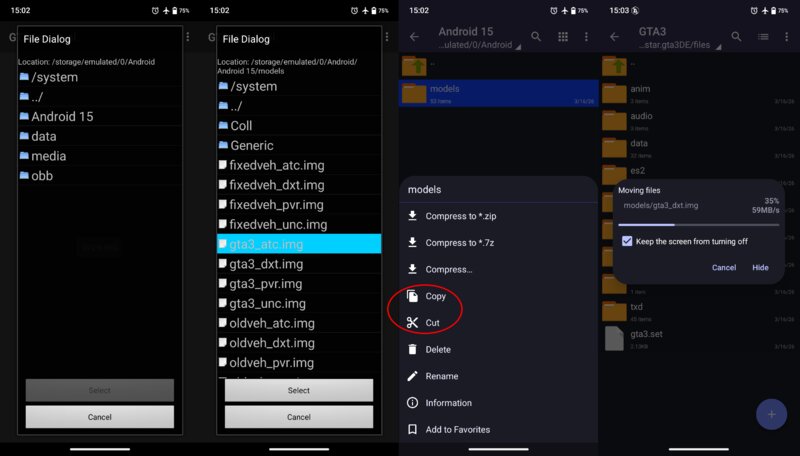
Now it's time for the trick that will allow you to access the game files and use the tools to modify them.
1. Use a file explorer with full system privileges and navigate to the game folder. Move the folder containing the files you want to modify from within the game files folder.
2. Create a folder outside the system root directory and place the moved files inside it.
3. Using the TXD and IMG tools, you can now modify the game files within the external folder.
4. After adding the desired modifications, move the moved files back to their original location. After launching the game, you will find the modifications you added.
Q: Will I be able to add other people's edits this way as well?
A: You can certainly add any modification without needing an external intermediary.
Q: So, I just need to move, for example, the "texdb" folder in GTA SA,VC outside the system folder, use the editing tools, and then move it back to its place. That's how I can add modifications.
A: Yes!
Q: What about Cleo mods?
A: Unfortunately, Cleo's modifications will not work even if you place them in the game's main folder.
Q: How do I install your modified apps?
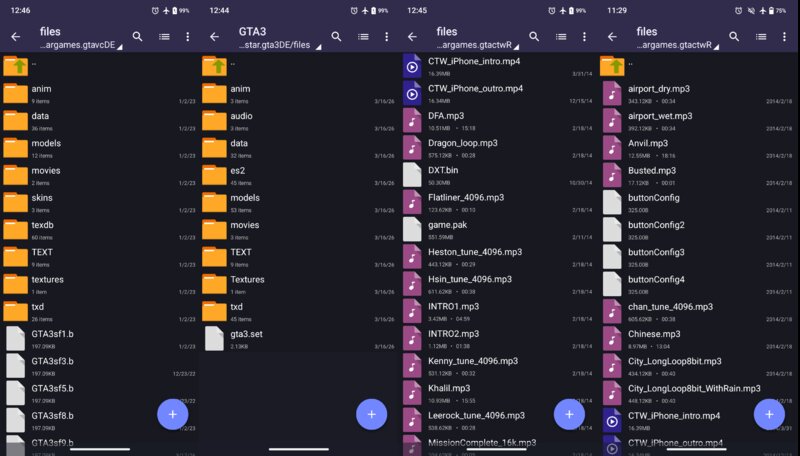
A: Follow the previous steps and change the folder names to:
com.rockstar.gta3DE
com.rockstar.gtavcDE
com.rockstar.gtasaDE
com.rockstar.gtactwR
Q: Where can I find other Rockstar games?
A: The links are in the archive; you can download them.

Are you the owner of this mod? If someone has stolen your work, you can make a request for removing this mod.
Report a stolen mod
|


|
Your Name/Nick: Your Message: Smileys: 


|




 Video.
 Loading...